
Reading Time: 8-minute read
TL;DR
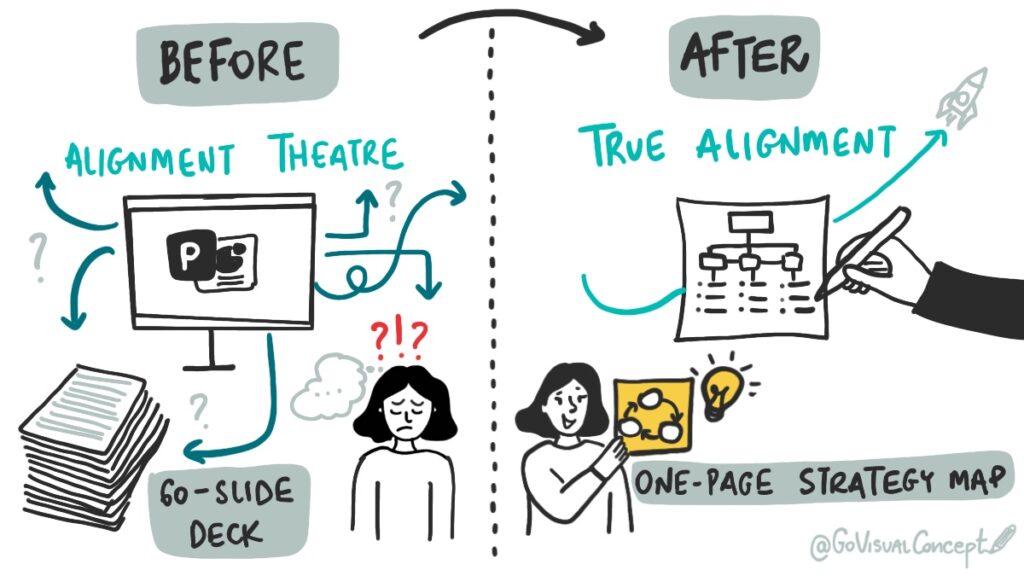
Stop wasting time on 60-slide decks. Traditional planning fails because it’s passive, complex, and creates “Alignment Theatre” instead of true alignment.
A one-page visual map is the solution. It pulls your strategy out of documents and makes it visible, collaborative, and actionable. This guide shows you exactly how to build one to align your team, drive faster decisions, and finally turn your goals into action.
_
It’s planning season again.
That time of year when teams lock themselves in conference rooms, open a 60-slide PowerPoint deck, and try to align on next year’s goals.
We’ve all been there. The energy drains from the room. Eyes glaze over. Someone checks their phone. Everyone nods politely, but nobody is truly aligned. You leave with a thick document that no one will ever read again—and a nagging feeling that you just wasted 4 hours of your team’s time.
Here’s the hard truth: Clarity doesn’t grow in documents. It happens when people can see the strategy together.
According to the Project Management Institute, 37% of projects fail due to a lack of clearly defined goals and alignment – a problem that starts in your planning sessions.
Your brilliant plan is useless if it’s hidden in a slide deck. If your team can’t see the strategy, they can’t align to it. It’s time to stop hiding your strategy in slides and start making it visible.
Why Your Current Planning Sessions Are Failing
The traditional “death by PowerPoint” approach to strategic planning is fundamentally broken. It’s expensive, ineffective, and demoralizing.
The problem isn’t your strategy; it’s the process.
It’s Passive: Participants are forced to be an audience to a presentation, not architects of a plan.
It Hides Connections: A linear slide deck makes it impossible to see how goals in Q1 affect resources in Q3.
It Creates “Alignment Theatre”: People nod in the meeting but walk away with five different versions of the plan in their heads. According to the Project Management Institute (PMI), a primary driver of project failure is this exact lack of shared understanding of goals.
You’re not just wasting time in a meeting; you’re paying a massive “Alignment Tax” in wasted work, missed deadlines, and frustrated teams for the next 12 months.
How Visual Strategic Planning Solves It
Visual strategic planning isn’t about “doodling”; it’s a focused methodology for turning your abstract goals into a concrete, shared map. Here’s how it fixes your planning sessions.
1. It Designs for Decisions, Not Just Discussion
A traditional agenda is a list of topics to talk about. A visual approach starts with the outcome. We design the session around the key decisions that need to be made. Are we deciding on budgets? Prioritizing three key initiatives? Mapping dependencies? The visual framework (like a canvas or a map) guides the team directly to those decision points.
2. It Anchors Complexity in Visuals
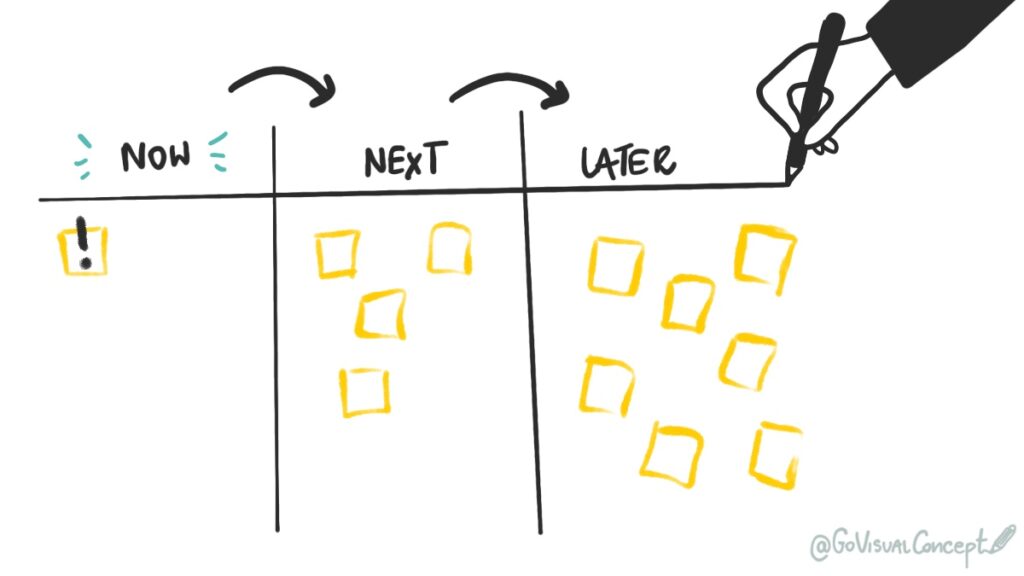
Your strategy is complex. It has multiple workstreams, dependencies, and stakeholders. Words and bullet points fail to capture this. Visuals, however, make it easy. A simple timeline, a “Now / Next / Later” framework, or a customer journey map can instantly reveal gaps, overlaps, and bottlenecks that would stay hidden in a 100-row spreadsheet for months.
3. It Externalizes the Conversation for True Alignment
This is the most powerful part. When someone draws as the team talks (live graphic recording or facilitation), thinking becomes visible to everyone, at the same time. The plan isn’t in the CEO’s head or hidden in a document; it’s right there on the wall, being built by everyone. When the team can see the plan evolve, they can align to it, challenge it, and—most importantly—commit to it.
Case Study: From “Report-Outs” to Real Decisions in 2 Hours
A global tech company’s HR leadership team was stuck in endless “report-out” meetings for their 2026 plan. Each region presented its own deck, but no one could see the big picture.
The Visual Fix: We scrapped the slide-deck agenda. Instead, we used a single, large visual canvas on a digital whiteboard (Miro) designed to map all regional initiatives against the three core company pillars.
The Result: Within two hours, the team visually identified a major budget overlap between two regions, saving $150,000 in duplicate spending. The conversation shifted from “reporting” to “real decisions.” They finalized their entire Q1 roadmap in that single session—a process that normally took weeks of email chains. The ROI? A 3x return on the 2-hour session investment.
Quick-Start Guide: Your First Visual Planning Session
You don’t need to be an artist to start. You just need a whiteboard (or Miro) and a clear process.
Stop “Presenting.” Start “Mapping.” Ditch the pre-made deck. Start with a blank canvas and a clear question, like, “What must be true for us to succeed next year?”
Use the “Now / Next / Later” Framework. This is the simplest visual map. Draw three big columns on your whiteboard:
- NOW: (The next 90 days / Q1)
- NEXT: (The 2 quarters after that)
- LATER: (End of the year)
Use Sticky Notes for Initiatives. Have the team write down every major project or goal on a sticky note.
Map & Connect. As a group, place the sticky notes in the “Now,” “Next,” or “Later” columns. Start drawing arrows between them to show dependencies.
Stop and See. Step back. You’ve just created your first strategic map. The gaps, the overloaded Q1, and the dependencies are now visible to everyone. Now you can have the real conversation.
FAQ: Visual Strategic Planning
Q: What’s the difference between this and a Gantt chart?
A: A Gantt chart is a project scheduling tool that shows when tasks happen on a timeline. A visual strategy map, however, is an alignment tool that shows why you’re doing things, how initiatives connect to your big-picture goals, and where dependencies exist. While a Gantt chart is perfect for execution, a strategy map is designed for collaborative decision-making and shared understanding during the planning phase.
Q: My team isn’t creative or “visual.” Will this work?
A: This isn’t about art; it’s about structure. Simple boxes, arrows, and sticky notes are all you need. In fact, teams that aren’t “creative” often benefit the most because this process gives them a clear, logical structure for their ideas. The visual framework reduces cognitive load and makes complex information easier to process—regardless of whether someone considers themselves “visual” or not.
Q: Can’t AI just generate a strategic plan for us?
A: AI can generate a document. It cannot generate human alignment. The magic of visual planning doesn’t come from the drawing itself; it comes from the shared conversation and the act of building the plan together. That’s what creates commitment. When your team co-creates the strategy map in real-time, they develop a shared mental model that no AI-generated document can replicate.
Q: What tools work best for this?
A: For in-person sessions: a big whiteboard, sticky notes, and good markers. For remote or hybrid teams: a digital whiteboard like Miro, Mural, or FigJam is essential. The key is to choose a tool that allows everyone to contribute simultaneously and see the strategy evolve in real-time. For distributed teams, digital whiteboards have the added benefit of creating an automatic artifact that can be referenced and updated throughout the year.
Next Steps: Stop Planning in the Dark
If your team can’t see the strategy, they can’t align to it.
Stop wasting your team’s most valuable energy in boring meetings that lead to zero clarity. It’s time to make your 2026 strategy visible, collaborative, and actionable.
👉 Start with the free tool:
Download the “5 Visual Thinking Hacks for Instant Clarity“ (PDF with instructions for visual planning) and run your first visual planning session this week.
Already know you need expert help?
Book a FREE discovery call and check how a custom strategy map can be built with your team.